
Forums › General Discussion › Wifi from your boat
- This topic has 1 reply, 2 voices, and was last updated 15 years, 9 months ago by
Hull152_Patrick.
-
AuthorPosts
-
-
January 17, 2011 at 2:57 pm #68225
 RichCarterParticipant
I just finished configuring and installing a bullet2hp wireless gateway on my boat. It ended up being fairly simple to do. There’s some stuff on the web about using this to increase the wireless range and we’ve had some discussion earlier. The wireless adapters that are built into most notebooks have short ranges. When cruising, I’ve found that there are frequently free access points within range of popular anchorages if you have a long range wireless adapter. The bullet is a neat self-contained wireless gateway. It has one ethernet port that connects to your computer using a standard RJ45 network cable. Power is provided over the same cable using a special little box (POE injector) that plugs into a 115v AC socket. The bullet and POE injector cost about $120 online. I already had an antenna that mates properly with the bullet type-N connector. Its only a 6db antenna. I might get a 12db antenna later if I need better coverage. Antennas are available online but they have the wrong connector (NMO). If purchasing one of these, you need an NMO to type-N adapter. These are available online or at local ham radio stores if any are in your neighborhood. An antenna and adapter should cost about $80.
Here’s a link to a vendor who sells a whole package for about $300.
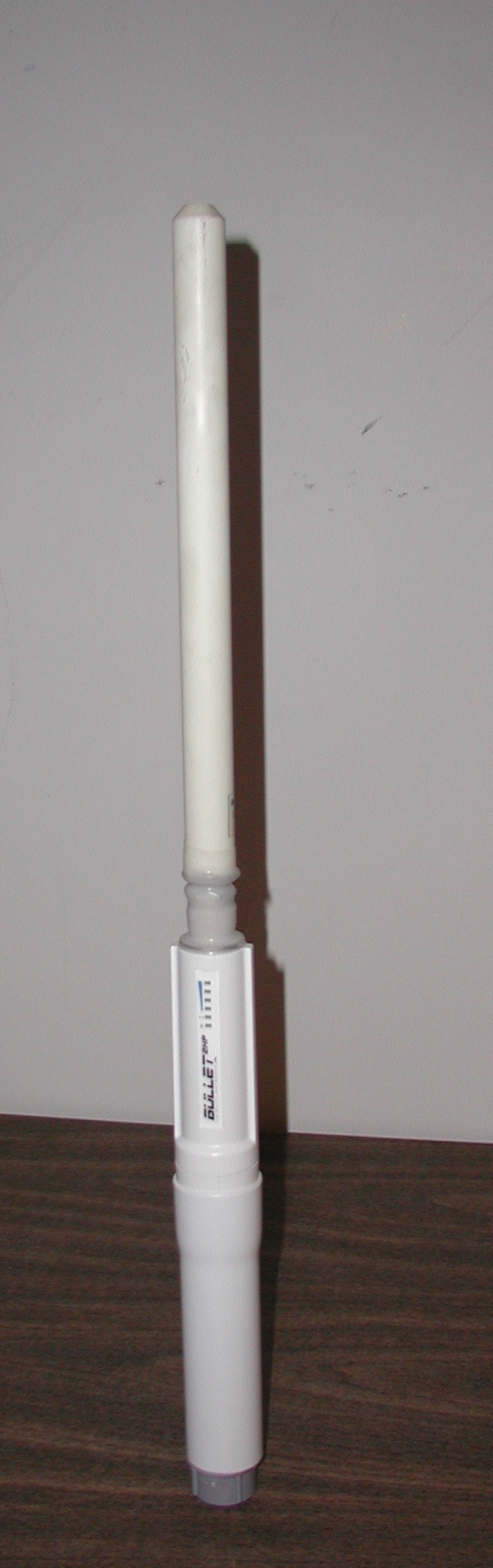
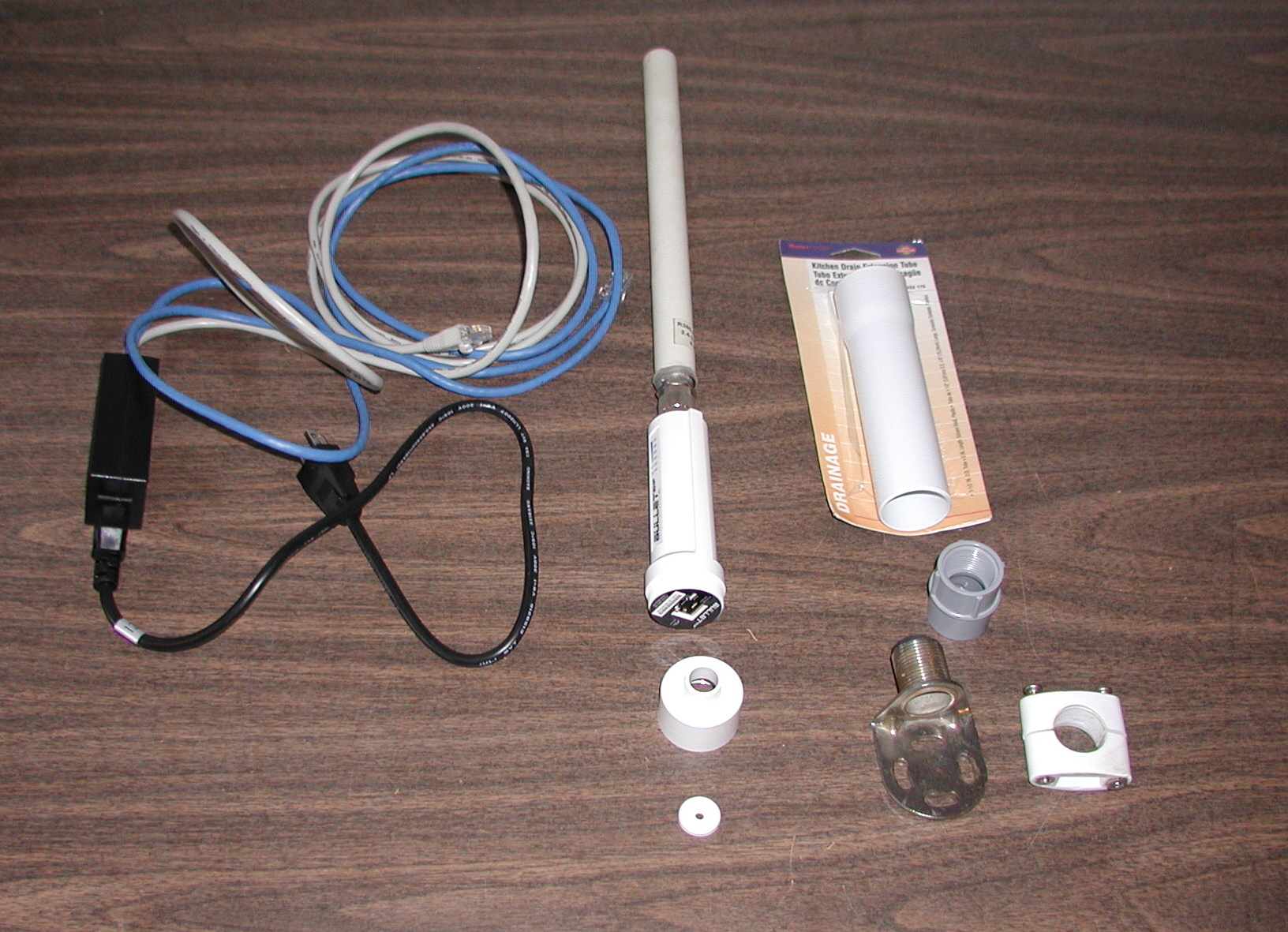
http://www.wififorboats.com/Mounting is awkward because the Bullet base is not designed to screw into a 1″ antenna mount. I came up with a solution using a kitchen sink drain tube and a threaded fitting for PVC conduit. I epoxied the threaded base from the bullet to the wide end of the drain tube and the threaded fitting to the narrow end. This made a short antenna extension that threads onto a standard marine antenna bracket. Photos below. The first photo is the completed assembly. The second photo shows the parts. From left to right, POE injector (powers the bullet over standard ethernet cable), bullet2hp shown with antenna attached and threaded base with rubber gasket below, and sink drain with PVC threaded fitting and rail bracket. The assembled photo shows that the antenna connector is sealed with self-sealing electrical tape. I recommend this instead of the vinyl stuff folks normally use. Glue from the vinyl tape can get into the connector. The self-sealing tape has no glue.
http://www.richardcarter.net/boat/pix/bullet2hp/bulletAssembled.JPG
http://www.richardcarter.net/boat/pix/bullet2hp/bulletParts.JPGSoftware installation is straightforward. You setup the bullet as a router and configure your computer using the IP address of the bullet as the gateway. This is explained in the bullet quick start guide. The guide they have online is for a different model but instructions are similar. I used the default settings provided in the manual and changed nothing. You open a browser using the bullet IP address and from there scan for available networks. Its best to disable the built-in wireless adapter.
My boat is on the hard so there is no way to compare performance on the water. A scan of my neighborhood showed several secure wireless systems that don’t show up with my laptop wireless adapter. My yacht club provides wireless service to our mooring field but you need a good antenna setup to get service. This should work well enough to provide decent bandwith web access and even TV service over the internet. I’m putting in a new satellite TV system so I don’t need broadband, but that’s another message.
Regards
Rich
_______________________________________________
maillist mailing listhttps://pearson424.org/mailman/listinfo/maillist_pearson424.org
Post generated from Pearson424 Forum using Mail2Forum
-
January 17, 2011 at 8:00 pm #76596
Hull152_Patrick
SpectatorI went a similar route as you, excepted i used sched 40 pvc and fitting to
enclose the bullet completely and mounted it on my mizzen masthead on a
functionally adequate but not that attractive teak bracket.Here’s a full write-up http://www.deepplaya.com/post/DIY-Wi-Fi-System.aspx
-p
—
s/v Deep Playa | Pearson 424 Hull #152 | http://www.DeepPlaya.comOn Mon, Jan 17, 2011 at 6:57 AM, wrote:
I just finished configuring and installing a bullet2hp wireless gateway on
my boat. It ended up being fairly simple to do. There’s some stuff on the
web about using this to increase the wireless range and we’ve had some
discussion earlier. The wireless adapters that are built into most notebooks
have short ranges. When cruising, I’ve found that there are frequently free
access points within range of popular anchorages if you have a long range
wireless adapter. The bullet is a neat self-contained wireless gateway. It
has one ethernet port that connects to your computer using a standard RJ45
network cable. Power is provided over the same cable using a special little
box (POE injector) that plugs into a 115v AC socket. The bullet and POE
injector cost about $120 online. I already had an antenna that mates
properly with the bullet type-N connector. Its only a 6db antenna. I might
get a 12db antenna later if I need better coverage. Antennas are available
online but they have the wrong connector (NMO). If purchasing one of these,
you need an NMO to type-N adapter. These are available online or at local
ham radio stores if any are in your neighborhood. An antenna and adapter
should cost about $80.Here’s a link to a vendor who sells a whole package for about $300.
http://www.wififorboats.com/Mounting is awkward because the Bullet base is not designed to screw into a
1″ antenna mount. I came up with a solution using a kitchen sink drain tube
and a threaded fitting for PVC conduit. I epoxied the threaded base from the
bullet to the wide end of the drain tube and the threaded fitting to the
narrow end. This made a short antenna extension that threads onto a standard
marine antenna bracket. Photos below. The first photo is the completed
assembly. The second photo shows the parts. From left to right, POE injector
(powers the bullet over standard ethernet cable), bullet2hp shown with
antenna attached and threaded base with rubber gasket below, and sink drain
with PVC threaded fitting and rail bracket. The assembled photo shows that
the antenna connector is sealed with self-sealing electrical tape. I
recommend this instead of the vinyl stuff folks normally use. Glue from the
vinyl tape can get into the connector. The self-sealing tape has no glue.http://www.richardcarter.net/boat/pix/bullet2hp/bulletAssembled.JPG
http://www.richardcarter.net/boat/pix/bullet2hp/bulletParts.JPGSoftware installation is straightforward. You setup the bullet as a router
and configure your computer using the IP address of the bullet as the
gateway. This is explained in the bullet quick start guide. The guide they
have online is for a different model but instructions are similar. I used
the default settings provided in the manual and changed nothing. You open a
browser using the bullet IP address and from there scan for available
networks. Its best to disable the built-in wireless adapter.My boat is on the hard so there is no way to compare performance on the
water. A scan of my neighborhood showed several secure wireless systems that
don’t show up with my laptop wireless adapter. My yacht club provides
wireless service to our mooring field but you need a good antenna setup to
get service. This should work well enough to provide decent bandwith web
access and even TV service over the internet. I’m putting in a new satellite
TV system so I don’t need broadband, but that’s another message.Regards
Rich
_______________________________________________
maillist mailing listhttps://pearson424.org/mailman/listinfo/maillist_pearson424.org
_______________________________________________
maillist mailing listhttps://pearson424.org/mailman/listinfo/maillist_pearson424.org
Post generated from Pearson424 Forum using Mail2Forum
Owners no more...
Thanks Dawn and Patrick!
-
-
AuthorPosts
- You must be logged in to reply to this topic.